
Email and chat
Easy to send. Hard to track which post, version, or reply counts as approval.
Upload finished posts and captions, then send one private review link. Clients approve each post or request changes without an account. Publishing stays in your current scheduler.
Free plan. No credit card required. Clients never sign up. No social accounts to connect.
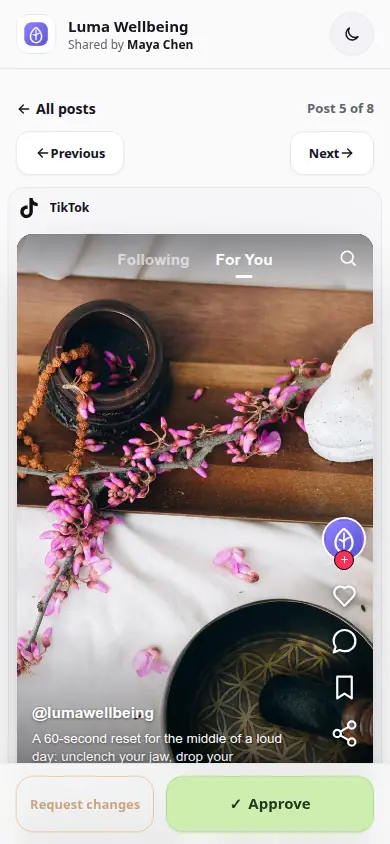
 Real client review
Review a full batch before anything reaches your scheduler.
Real client review
Review a full batch before anything reaches your scheduler.
THE SHORT ANSWER
Social media approval software gives clients a clear way to review posts before they go live. With ApprovePost, they approve each post or request changes through a private link. You continue scheduling and publishing with your current tool.
Most scheduling tools are built for publishing, not for approval. The result is the same awkward loop: you send a screenshot in a chat, the client replies with “looks good but change X,” someone schedules the wrong version, and the caption you actually published never got an explicit yes.
A social media approval workflow closes that gap without adding another platform to manage. Content is produced, approved, and then published. Each job has its own tool, and the approval step is handled separately.
Planning and scheduling live in your existing calendar or scheduler. Content production lives in your design tools. Client approval happens in ApprovePost. Publishing stays in your scheduler. ApprovePost covers the third stage and only the third stage.
The right choice depends on what is already working and what is missing.
Easy to send. Hard to track which post, version, or reply counts as approval.
Good for storing files. It does not give each post a clear approval status.
Useful when you want planning, approval, scheduling, and publishing in one platform. Compare the Planable approach.
Built for one step. Send finished posts for approval, then publish with the scheduler you already use.
Your client can work through the batch and decide on each post.
Add the finished posts, captions, and videos for one client into a review.
Send one private review link. No client account, no login.
The client walks through each post with its caption, checking the status as they go.
Change requests come back with feedback attached to the specific post.
Revise and resubmit, collect approval, then publish the approved set from your scheduler.
The client accepted the post. It is ready to be scheduled.
The client left feedback and the post returns to revision.
Sent but unanswered, or a new version waiting for re-approval.
Group posts for one client into a single review, up to 10 posts on Free and 100 on Pro. No per-post file sharing.
Images, MP4 videos, captions, and a social network frame - Facebook, Instagram, X, TikTok, LinkedIn, or Reddit - travel together, so approval covers the whole post as it will be seen.
One private link per review. It shares the review, not the account, so clients never sign up.
Requesting changes requires written feedback, so revision notes arrive ready to hand to the designer.
Edit captions or upload new media versions, resubmit, and keep the review history for the record.
Get email updates when a client starts reviewing, approves, or requests changes on a post.
A freelance social media manager prepares five posts for a coffee brand, everything captioned and formatted, approved in a single review each week.
On Monday they create a review, upload the five posts, and send the link. The client opens it over lunch, approves four, and requests changes on the reel with “swap the intro shot for the pour-over close-up.” The manager replaces the video, resubmits, and the client approves it by Tuesday.
The manager then schedules all five posts in the client's usual scheduler, knowing exactly what was approved and when. No Monday-morning guessing about which version of a Reel made it to the queue.
Plan with your scheduler, design with your editors, approve with ApprovePost, and publish from the tool you already trust.
Approve first. Publish with your current scheduler.
Free plan. No credit card required. Clients never sign up. No social accounts to connect.