
The client has the current version. The agency waits for a decision.
CONTENT APPROVAL FOR AGENCIES
Client content approval for small social media agencies
Send finished client content in one private approval link and get a clear decision on every item. Built for small agencies and freelancers managing client approvals one batch at a time. Clients do not need an account.
No credit card required. No client signup.
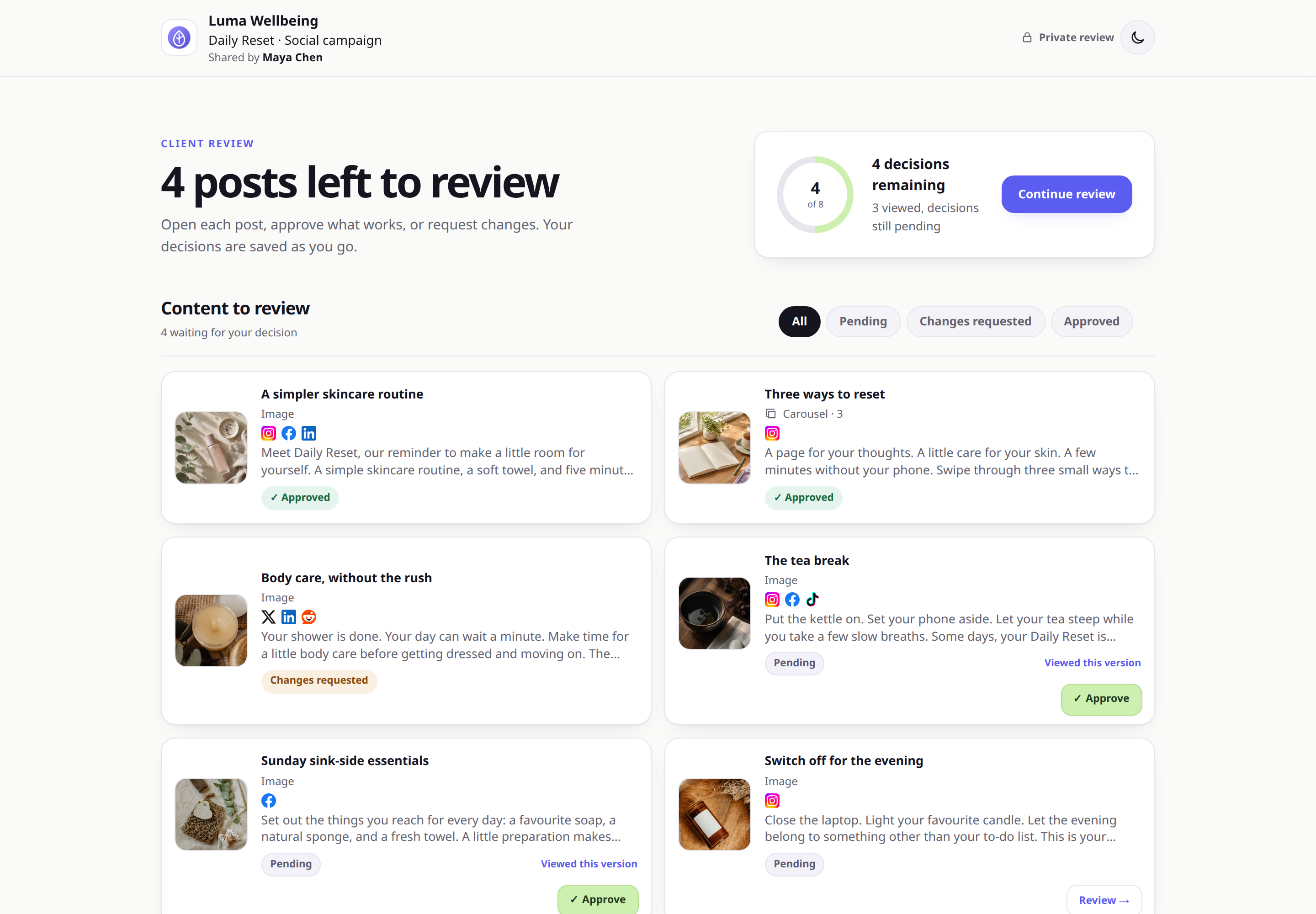
 Example client view
One approval request shows each item, its current version number, feedback, and decision.
Example client view
One approval request shows each item, its current version number, feedback, and decision.
THE SHORT ANSWER
ApprovePost gives one account owner a simple way to collect client approval. You create the approval request and your client uses the private link without an account. It is not a team workspace and does not include teammate seats or named reviewer accounts.
THE AGENCY PROBLEM
Client approvals get messy when decisions live in messages
A client reply can be useful feedback without being final approval.
The account manager sends files by email. The client answers in a DM. A second reviewer comments on an older version. The designer makes another change. Then someone asks whether the post is ready to publish.
The issue is not a lack of communication. It is that the content, feedback, current version, and final decision are in different places.
ApprovePost puts the decision next to the content. During review, each item is Awaiting review, Approved, or Changes requested.
Common approval leaks
- Feedback split across email, Slack, WhatsApp, and DMs
- Clients responding to an older export
- Several people giving conflicting instructions
- Revisions with no clear route back to review
- Silence or “looks good” treated as final sign-off
A REPEATABLE CLIENT WORKFLOW
Five steps from finished work to approval
You prepare and send the review. Your client only needs to review and decide.
- 1
Finish the content
Prepare the images, videos, and captions in your usual tools.
- 2
Create one approval request
Add the finished items for one client and check how each post will appear.
- 3
Send the private link
Share it by email, chat, or any channel you already use with the client.
- 4
Handle requested changes
Update the caption or media, then send the revised post back for another decision.
- 5
Move approved work forward
Publish or deliver approved content with the tools you already use.
CLEAR OWNERSHIP
The status tells the agency what happens next
Your team does not need to reread the conversation before acting.
The agency owns the next step. Feedback explains what must change.
The current version has a recorded yes and can move toward publication.
MULTIPLE CLIENTS, LESS CONFUSION
Keep each approval request tied to one client and one batch
A clear boundary makes agency work easier to manage. One client gets one link for the content they need to review. They do not see another client's work.
The Free plan includes 2 approval requests total with up to 10 items each, available for 30 days after activity. A Free approval request is used when you create its first approval link; completing or deleting it does not restore the Free allowance. Pro supports 20 active approval requests with up to 100 items each, available for 90 days after activity. When availability ends, an approval request becomes inaccessible. Automatic retention cleanup deletes the review no earlier than 7 days after availability ends and 7 days after a deletion notice is accepted by our email delivery service. Deletion you request follows its own workflow. See every plan limit.
When changes are requested, those items return to revision while approved items keep their status. Update the requested items, then send the revised posts back for review.
For a wider look at the product, see content approval software. Social teams can also review the social media approval workflow.
Set the rule before review starts
Name one final approver on the client side. Other people can give feedback, but one person owns the final yes. This prevents two reviewers from pulling the work in different directions.
AGENCY USE CASES
One approval pattern for several kinds of client work
Social media agencies
Send a weekly or monthly batch with the visual, caption, format, and approval status together.
Freelance social media managers
Give each client the same simple review process without asking them to learn your publishing tool.
Creative agencies
Collect focused feedback and sign-off on review-ready images and videos. Use a full proofing tool if you need annotations.
Marketing consultants
Record the client's final decision before handing content to the person who publishes or delivers it.
MAKE THE PROCESS EXPLICIT
Define approval before the first link goes out
Write down the owner, reviewer, final approver, deadline, and accepted statuses. Then use the same rules for each client.
The original content approval workflow template gives your agency a free manual version. It includes fields for versions, feedback, deadlines, changes, and final approval.
The content approval workflow guide explains how to assign approval ownership and avoid conflicting feedback.
ApprovePost is not an agency operating system
It does not manage projects, assign production tasks, schedule posts, or report social performance. Keep those jobs in your existing tools. Use ApprovePost for client review and sign-off.
START WITH A REAL CLIENT BATCH
The Free plan includes 2 approval requests total. Pro is $12/month with more active approval requests, larger batches, and custom branding. Compare ApprovePost plans.
START FREE
Send your next approval request
Add the finished content, share one private link, and get a clear decision on every item.
No credit card required. No client signup.