
A simpler Filestage alternative for client approval
Send finished content through one private approval link. Clients can approve each item or request changes without creating an account. Choose Filestage when you need detailed annotations or several review stages.
No credit card required. No client signup.
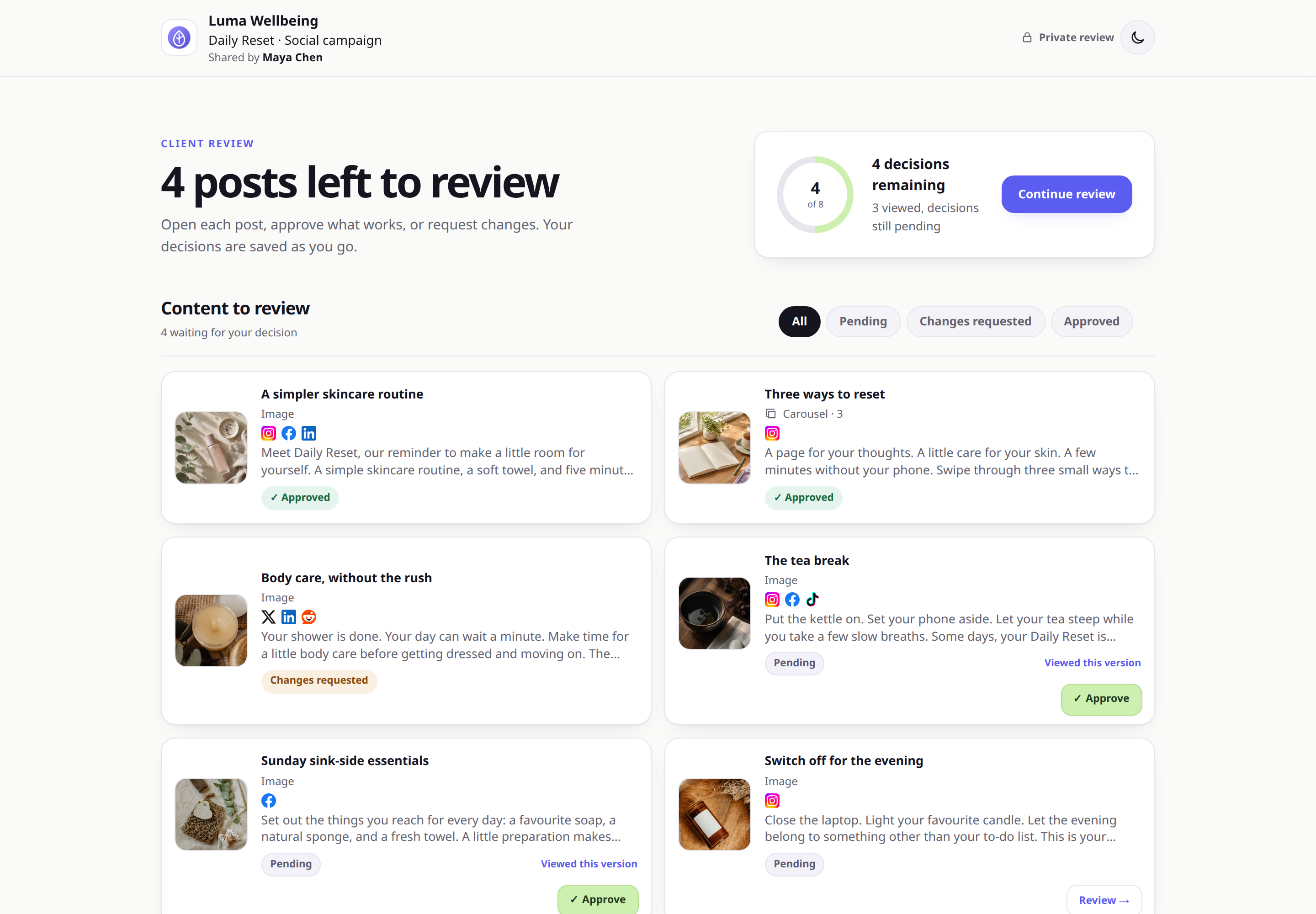
 Example client view
Clients review finished content and make a clear decision in one place.
Example client view
Clients review finished content and make a clear decision in one place.
THE SHORT ANSWER
Choose Filestage when you need visual annotations, broad file proofing, or several review stages. Choose ApprovePost when you need a focused client approval step for finished content. Both let reviewers participate without creating an account.
Filestage supports detailed proofing. ApprovePost keeps client approval simple.
The right choice depends on how much review structure your work needs.
Filestage is built to proof many file types with visual markup, reviewer groups, due dates, and structured review rounds. That scope fits teams that manage detailed creative feedback across several stakeholders.
ApprovePost covers a narrower step. You add review-ready posts, captions, images, or videos. Then you send one private link. The client approves each item or requests changes with written feedback.
If you already have tools for creation and publishing, ApprovePost can handle the decision in between. Read more about its content approval software and focused online proofing workflow.
Start with the feedback you need
- Need someone to draw on a file? Filestage has annotation tools.
- Need internal and external review stages? Filestage supports reviewer groups.
- Need a client to approve finished content? ApprovePost keeps that path short.
- Need social scheduling or publishing? Use a dedicated publishing tool.
ApprovePost vs. Filestage
This table compares current product scope, not marketing promises. Details were checked against Filestage's official pricing and help pages on September 30, 2026.
| Decision point | ApprovePost | Filestage |
|---|---|---|
| Primary use case | Final client review and approval before publishing | Online proofing across files, stakeholders, and review rounds |
| Content reviewed | Social posts with captions, images, videos, and image or video carousels | Videos, images, designs, documents, websites, interactive HTML, and audio |
| Client access | No account required. The client opens a private approval link. | No account required for reviewers. Reviewers enter their name and email to identify their feedback without creating an account. |
| Approval decisions | Approve or request changes for each content item | Review decisions and statuses within reviewer groups |
| Feedback | Written feedback is recorded on the content item's current version | Comments plus pens, shapes, text highlights, and other annotation tools |
| Revisions and versions | Media or caption revisions create a new version number. Decisions and feedback remain visible, but earlier media files are not kept as a browsable archive. | Unlimited versions with access to earlier versions and their comments |
| Review stages | One focused client approval flow. No complex routing or multi-stage approval setup. | Reviewer groups for internal and external rounds; advanced workflow options depend on plan |
| Scheduling and publishing | Not included | Not included |
| Pricing approach | Free, then Pro at $12/month per account | Free plus paid plans based on features and team members, starting with 10 included members |
| Strongest fit | Freelancers and small teams that need a focused client approval step | Creative and marketing teams that need broader proofing, annotations, and structured review workflows |
Disclosure: ApprovePost publishes this comparison and is one of the products being compared. Filestage facts are based on official vendor information checked . ApprovePost is not affiliated with or endorsed by Filestage. Feature availability can change by plan. Confirm current requirements on the official Filestage pricing page.
Choose based on the work your client must do
Choose ApprovePost if...
- Your client mainly needs to approve or request changes.
- You review social content, captions, images, or short videos.
- You are a freelancer or small agency with a direct client workflow.
- You want one private link and no client signup.
- You already use another tool to schedule and publish.
- You do not need annotations or approval routing.
Choose Filestage if...
- Reviewers need to draw, mark, or highlight exact areas.
- You proof documents, websites, audio, and other file types.
- You need separate internal and external reviewer groups.
- Several stakeholder rounds must happen in a defined order.
- Due dates, reminders, reports, or formal audit needs shape the process.
- Your team needs a broad online proofing platform.
From finished content to a recorded yes
The client opens the private link without creating an account.
Prepare
Add the review-ready content, captions, images, or video.
Share
Send one private approval link in the channel you already use.
Review
The client checks each item and leaves feedback where needed.
Revise
Update the caption or media and submit a new version for review.
Approve
The client approves the revised item. Its status and review activity remain visible.
Compare the plan, not just the starting price
ApprovePost has a Free plan and a $12/month Pro plan. Pro includes 20 active approval requests, up to 100 posts per approval request, and custom branding.
Filestage offers Free, Starter, Business and Enterprise plans. Prices depend on currency, billing interval and plan options; confirm the current quote on its official pricing page. Pricing presentation and reviewer identification were rechecked on .
The products are priced for different workflows. If you need annotations, reviewer groups, advanced comparison tools, or structured proofing, compare the Filestage plan that includes those features. If you only need clear client feedback, revisions, and approval before publishing, compare that broader feature set with the simpler ApprovePost workflow.
Filestage facts checked September 30, 2026
KEEP YOUR CURRENT TOOLS
If you already have the tools you use to create and publish content, ApprovePost can handle the approval step in between. It also works as focused social media approval software when publishing stays in your scheduler.
Send one private link for client approval.
Start on the Free plan. Your client can review, request changes, or approve without creating an account.
No credit card required. No client signup.