
Keep your scheduler. Add a simpler client approval step.
Upload finished posts, send one private link, and let clients approve or request changes without an account. Publishing stays in the tool you already use.
No credit card required. No client signup.
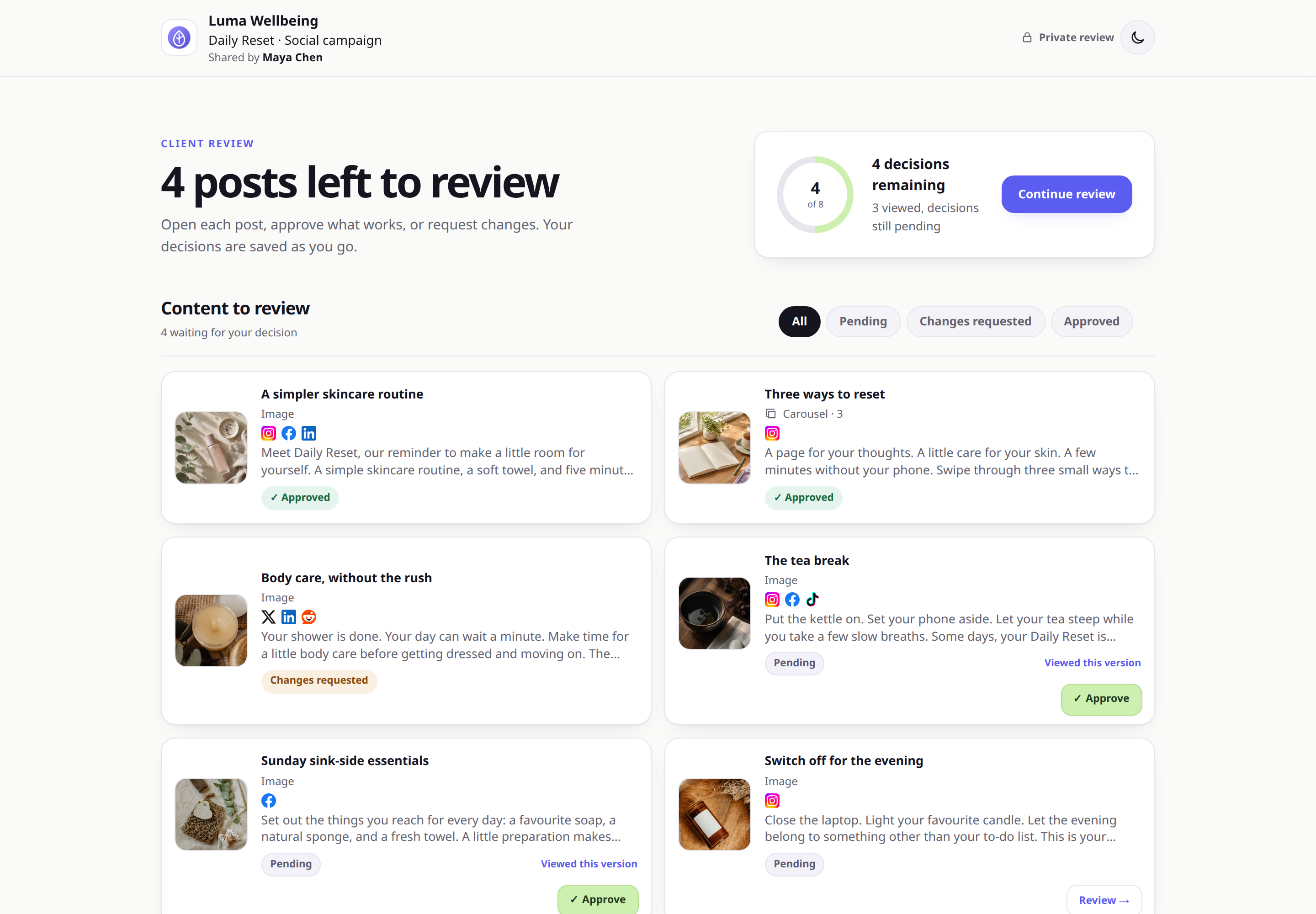
 Example client view
One focused client view for content, feedback, current version numbers, and decisions.
Example client view
One focused client view for content, feedback, current version numbers, and decisions.
THE SHORT ANSWER
ApprovePost is not a full replacement for Planable. Choose Planable for planning, collaboration, scheduling, and publishing in one social media workflow. Choose ApprovePost when your scheduler already works and the missing piece is easy client approval.
Planable manages the full social workflow. ApprovePost handles client approval.
A broader product is useful when you want to move planning and publishing into it.
Planable combines workspaces, calendars, social post creation, team and client collaboration, approvals, scheduling, and direct publishing. Optional analytics and social inbox products extend that workflow.
ApprovePost starts later. Your team finishes content in the tools it already uses. Then you add the review-ready posts, send one private link, and wait for a clear decision. Approved work goes back to your current publisher.
This makes ApprovePost a focused social media approval software option, not another social media management suite.
The main workflow difference
Planable’s public links let people view and comment without logging in, but they do not support approval actions. To approve content in Planable, the client is invited into the workspace.
ApprovePost lets the client approve or request changes directly from a private link without an account. It focuses on the approval step and leaves publishing in the tools you already use.
ApprovePost vs. Planable
Planable is stronger when the approval step belongs inside a full social media workflow. ApprovePost is narrower by design.
| Decision point | ApprovePost | Planable |
|---|---|---|
| Primary use case | Dedicated client approval between creation and publication | Social content planning, collaboration, approval, scheduling, and publishing |
| Client review without an account | Yes. Clients review and make decisions through a private link. | Public links allow viewing and comments without login, but not approval actions. Approval requires workspace access. |
| Approval workflows | One focused approval flow per approval request | None or Optional on Basic; Required on Pro; multi-level approval on Enterprise |
| Planning and calendar | Not included | Feed and calendar views, with more views depending on plan |
| Scheduling and publishing | Not included. Keep your current publishing tool. | Included for supported social platforms |
| Feedback and revisions | Written feedback, change requests, media or caption revisions, version numbers, and review history | Comments, annotations, suggestions, approvals, and broader collaboration controls |
| Analytics and inbox | Not included | Available as separate add-ons on paid plans |
| Pricing approach | Free, then Pro at $12/month per account | First 50 created posts free, then paid per workspace |
| Strongest fit | Freelancers and small agencies that already have publishing tools | Agencies and marketing teams that want content planning through publishing in one platform |
Disclosure: ApprovePost publishes this comparison and is one of the products being compared. Planable facts are based on official vendor information checked . ApprovePost is not affiliated with or endorsed by Planable. Plan and feature packaging can change.
Decide whether you need a new suite or one missing step
Choose ApprovePost if...
- You already use Buffer, Later, Metricool, Hootsuite, or another publishing tool.
- You want approval to stay separate from your scheduling and publishing tools.
- You want one private link for review and approval.
- You need clear per-item approval and change requests.
- You want to keep planning and publishing where they are.
- Your workflow does not need approval levels or social analytics.
Choose Planable if...
- You want to plan, create, approve, schedule, and publish in one product.
- Your team needs shared social calendars and brand workspaces.
- You want required or multi-level approvals tied to publishing.
- You want client approval connected directly to planning, scheduling, and publishing.
- You want social performance or inbox add-ons in the same product.
- You are ready to move the wider social workflow.
Add approval without moving publication
The handoff stays simple and easy to repeat for every client batch.
Create
Prepare and finish content in your current production tools.
Review
Add the finished posts to one ApprovePost approval request.
Decide
The client approves or requests changes through the private link.
Revise
Update items with Changes requested and submit the next version.
Publish
Move only approved content into the scheduler you already use.
Planable charges per workspace. ApprovePost Pro is $12/month per account.
ApprovePost has a Free plan. Pro costs $12/month per account and includes 20 active approval requests with up to 100 posts per approval request.
Planable gives new users their first 50 created posts free, with no time limit or credit card required.
For monthly billing, Planable's current official documentation lists Basic at $39 per workspace per month and Pro at $59 per workspace per month. Its yearly pricing view shows discounted effective rates of about $33 and $49 per workspace per month. Enterprise pricing is custom.
Planable also changes approval capability by plan. Optional approval is available on Basic. Required approval is available on Pro. Multi-level approval is an Enterprise feature.
If you manage several client workspaces, compare the total workspace cost with the approval-only workflow you actually need. Review ApprovePost pricing before comparing the total cost for your client count.
Planable facts checked September 30, 2026
BUILD THE HANDOFF
The approval tool is only one part of the process. Use the social media approval workflow guide to define who decides, how feedback is handled, and when approved posts move to publishing. For other client work, see content approval software.
Keep your scheduler. Make client approval easier.
Send a private approval link, collect a clear decision on each post, and publish with the tool you already use.
No credit card required. No client signup.