
Keep each client’s posts together
Create a review for one client and add the images, videos, and captions they need to approve. Feedback stays attached to the right post.
Keep each client’s posts, feedback, and approvals together without adding another complex tool. Send a private review link so your client can approve or request changes on each post without an account.
2 client reviews free · No credit card · No client account
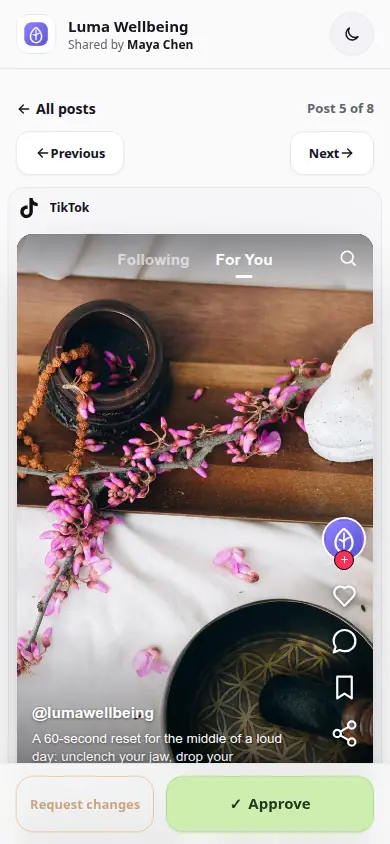
 Real client review
One link for every post, change request, and decision.
Real client review
One link for every post, change request, and decision.
Prepare content in your usual tools. Give each client a clear place to review it.
Create a review for one client and add the images, videos, and captions they need to approve. Feedback stays attached to the right post.
Share one private link by email or chat. Your client opens it on desktop or mobile and approves or requests changes, with no signup.
See which posts need changes and which are approved. Update the requested posts and send them for review again through the same link.
YOUR WEEKLY CLIENT REVIEW
You have prepared a week of posts for a coffee shop. Instead of sending individual images and captions through a chat, put the batch in one client review.
Your client approves four posts and requests a caption change on the fifth. The feedback sits beside that post, so you can revise it and send it back for a new decision. The other four keep their approval status.
Use Free to try your approval process with a client. Choose Pro when you are sending reviews regularly.
Free includes 2 lifetime client reviews with up to 10 posts each. A review counts on its first successful send; completing or deleting it does not restore the Free allowance.
Pro supports 20 active reviews with up to 100 posts each for $12/month. One account owner manages the reviews; teammate seats and named reviewer accounts are not included.
Add your posts, share one private link, and keep every decision with the right content.
2 client reviews free · No credit card · No client account